Resources
Best Meeting Room Display by Room Size: The DTEN Range
Which is the best meeting room display for your room? Match the DTEN range, from the D7X 27 to the D7X 75, to room size, camera coverage and meeting platform.

The best meeting room display is the one matched to your room size. Choose a 27-inch all-in-one for huddles of one to three people, a 55-inch board or a camera bar for rooms of four to six, and a 75-inch board with extra camera coverage for rooms of 13 or more. For rooms of seven to twelve, DTEN pairs a 55-inch board with its Vue camera system.
Room size is a rule of thumb, not a hard limit. Seating layout, room shape, acoustics and your meeting platform (Zoom Rooms, Microsoft Teams Rooms or Google Meet) all change the answer. The sections below take the DTEN range room by room. To see how it scores against other brands on the same criteria, read Part 2: the published-spec scorecard. To see the whole range UDD supplies, visit DTEN Solutions.

Quick pick by room size
Choose in two questions
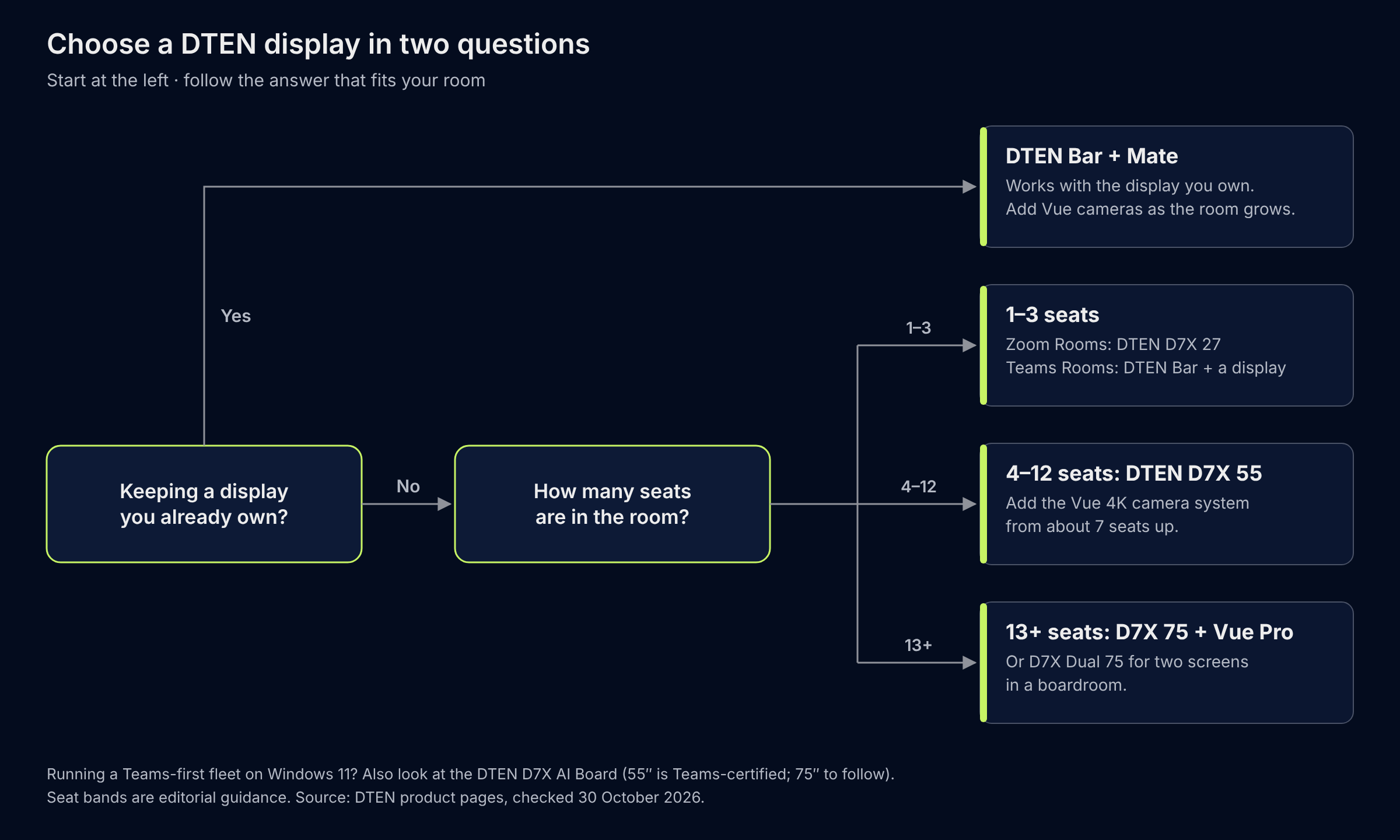
Text version:
1. Are you keeping a display you already own? If yes, choose the DTEN Bar with the DTEN Mate, and add Vue cameras as the room grows.
2. If not, choose by seats:
- 1–3 seats: DTEN D7X 27 for Zoom Rooms, or a DTEN Bar with a display for Teams Rooms.
- 4–12 seats: DTEN D7X 55, adding the Vue 4K camera system from about 7 seats up.
- 13 or more seats: DTEN D7X 75 with Vue Pro, or the D7X Dual 75 for two screens.
1. Huddle and personal spaces (1-3 people)
DTEN D7X 27: the compact all-in-one
The D7X 27 is a 27-inch Full HD (1080p) touch display with 10 touch points. It runs Android 12 with native Zoom Rooms and combines a three-camera array (combined horizontal field of view of 160°, with a 90° main camera) with an 8-microphone array and integrated stereo speakers. A single USB-C cable gives BYOD access to its camera, mics and speakers from a laptop. DTEN positions it for huddle spaces, executive offices, focus rooms and personal desks, and also for kiosk and contact-centre use. DTEN lists Zoom Rooms certification for the D7X 27 and does not list Microsoft Teams.
Choose it when: the room is small enough that a 27-inch screen is readable from every seat, and your platform is Zoom Rooms.
2. Small rooms (4-6 people)
DTEN Bar + DTEN Mate: bring your own display
The DTEN Small Room Solution pairs the DTEN Bar with the DTEN Mate tabletop controller. DTEN says it suits up to 6 in-room participants. The Bar has a 4K (8MP) camera with a 95° horizontal field of view, a 12-element microphone array and stereo speakers (2 x 15W). It mounts above or below a single display, or vertically between two. It is certified for Zoom Rooms and Microsoft Teams Rooms, and a single USB-C cable gives BYOD sharing with 65W laptop charging.
One detail that matters when you specify the room: DTEN says the Mate WiFi version is certified only for Zoom Rooms, and recommends the Mate PoE version for Teams.
Choose it when: you already have a good display on the wall, or you want a separate screen of any size.
DTEN D7X 55: the all-in-one for small and medium rooms
The D7X 55 is a 55-inch 4K touch display with 20 touch points, a 4K camera with a 120° field of view, a 15-microphone array and integrated stereo speakers. It is available with Windows IoT or Android, is certified for Zoom Rooms and Microsoft Teams, and supports dual screens. DTEN lists the D7X 55 and the Bar as its small-room options, and the 55-inch with the Vue 4K camera system as the step up for medium spaces.
Choose it when: you want display, camera, mics and speakers in one wall-mounted unit and you use more than one meeting platform.
3. Medium rooms (7-12 people)
At this size, one wide-angle camera in the screen starts to struggle with the far end of the table. DTEN's answer is modular: the D7X 55 or the DTEN Bar can be extended with the DTEN Vue 4K camera system for added video coverage. Its Mate Gen 2 console adds an 11.6-inch tabletop touchscreen with its own 6-microphone array.
DTEN pick: D7X 55 or DTEN Bar with the Vue 4K camera system. The D7X 55 keeps the 120° field of view, 20-point 4K touch and 15-microphone array described above.
Choose it when: you want to start with a single certified board or bar and add camera coverage as the table gets longer.
4. Large rooms and boardrooms (13+ people)
DTEN D7X 75 with DTEN Vue Pro
The D7X 75 is a 75-inch 4K touch display with 20 touch points and a 15-microphone array. DTEN publishes a 90° field of view for the 75-inch camera, narrower than the 55-inch, which is why DTEN pairs large rooms with extra coverage: its room solutions page recommends the D7X 75 or the Bar with the DTEN Vue Pro camera system, plus DTEN Orbit Connect for third-party audio. The D7X Dual 75 doubles the display area with two 75-inch 4K screens, a central 4K camera and two Vue Pro cameras.
Choose it when: you want a single certified Zoom Rooms and Teams system that you can grow with cameras and audio rather than replace.
DTEN D7X AI Board (Teams-first rooms)
DTEN's newest board runs Windows 11 and comes in 55-inch and 75-inch sizes. DTEN's spec sheet lists it for Microsoft Teams Rooms and Zoom Rooms. DTEN publishes a 48MP centre camera (102° horizontal), two 4K AI depth sensors with 160° combined coverage, a 15-element beamforming microphone array and 40W front-facing stereo. Its Vue Pro, Relay Speakers and Mate Gen 2 console extend it into larger rooms. DTEN's 17 September 2026 announcement says the 55-inch model is certified for Microsoft Teams on Windows, with 75-inch certification expected to follow. We have not scored it, because its main differences (depth sensing and per-person framing) fall outside the four spec criteria in Part 2.
Five questions to settle before you buy
- Which platform will the room run? Zoom Rooms, Teams Rooms or Google Meet decides which products are on the table. Dual-platform boards keep your options open.
- All-in-one or bar plus display? An all-in-one is faster to deploy. A bar lets you reuse a display you already own and pick any screen size.
- How wide is the room, not just how many seats? A long, narrow boardroom needs more camera and audio coverage than a square room with the same headcount.
- How will the room be managed? Look for remote device management and support terms. DTEN includes DTEN Orbit with its devices and sells Orbit Pro for extended support.
- How will it be mounted? Large boards are heavy: DTEN publishes 21.3 kg for the D7X 55 and 36.1 kg for the D7X 75 (Windows edition; the Android edition is slightly heavier). Stands, mounts and carts add more, so confirm wall structure before delivery.
For a wider look at room technology beyond displays, see AV Solutions for Corporate Offices: What Works Best in 2026.
Four common mistakes when choosing a meeting room display
- Choosing by headcount alone. A long, narrow room needs more camera and audio coverage than a square room with the same number of seats.
- Assuming a bigger screen sees more of the room. On DTEN's published figures, the 75-inch D7X has a narrower camera field of view (90°) than the 55-inch (120°).
- Overlooking platform certification. DTEN says the DTEN Mate WiFi controller is certified only for Zoom Rooms and recommends the Mate PoE version for Teams. DTEN lists the D7X 27 as certified for Zoom Rooms only.
- Leaving the install until last. DTEN's boards run from 21.3 kg (D7X 55) to 36.1 kg (D7X 75), Windows edition, before any stand or mount, so check the wall, stand or cart before you order.
Meeting room display glossary
All-in-one board: a touchscreen display with the camera, microphones and speakers built in, so the room needs no separate camera or sound bar.
Camera bar: a camera, microphone and speaker unit that mounts above or below a display you already own.
BYOD (bring your own device): connecting your own laptop, usually with one USB-C cable, to use the room's camera, microphones, speakers and screen with any meeting app.
Field of view (FOV): how wide a camera can see, in degrees. A wider field of view captures more of the room from edge to edge.
Touch points: the number of fingers or pens a screen can track at the same time.
Microphone array: several microphones working together to pick up voices around a room and reduce background noise.
Zoom Rooms and Microsoft Teams Rooms: meeting-room software from Zoom and Microsoft. A device certified for one is validated by that vendor to run it; certification for one does not imply the other.
FAQ
What is the best display for a small meeting room?
For up to six people, a 55-inch all-in-one such as the DTEN D7X 55, or a camera bar such as the DTEN Bar paired with a display you already own, covers most small rooms.
What size display do I need for a meeting room?
As a rule of thumb: 27 inches for huddle spaces of one to three people, 50 to 55 inches for small rooms, 55 to 65 inches for medium rooms (with added camera coverage) and 75 inches or larger for boardrooms. Seating distance and room shape matter as much as headcount.
Is an all-in-one board better than a camera bar plus a display?
Neither is better for every room. An all-in-one reduces components and deployment time. A bar suits rooms where a display already exists or where you want a particular screen size.
Do I need extra cameras or speakers in a large room?
Usually yes. A single camera and microphone array built into a screen has limited reach, which is why DTEN offers add-on cameras and speakers for larger rooms.
What is the difference between the DTEN D7X 55 and D7X 75?
Both are 4K touch displays with 20 touch points, a 15-microphone array, and Zoom Rooms and Microsoft Teams certification. The D7X 55 has a 120° camera field of view and weighs 21.3 kg (Windows edition). The D7X 75 has a 90° field of view and weighs 36.1 kg (Windows edition), and suits larger rooms, usually with added Vue Pro cameras.
Which DTEN displays work with Microsoft Teams Rooms?
DTEN says the D7X 55 and D7X 75 are certified for Zoom Rooms and Microsoft Teams, and the DTEN Bar is Teams-certified, with the Mate PoE controller recommended for Teams. DTEN lists the D7X 27 as certified for Zoom Rooms only. The 55-inch D7X AI Board, which runs Windows 11, is certified for Microsoft Teams on Windows, and DTEN says 75-inch certification is expected to follow.
Can I use a DTEN D7X with any meeting app?
Yes, in BYOD mode. DTEN says you can connect a laptop with a single USB-C cable and use the D7X camera, microphones, speakers and touch with any software client.
How does the DTEN range compare with other meeting room displays?
On the four published-spec criteria we scored (display and touch, camera coverage, microphones and platform choice), the D7X 55 scored 8 of 8, the highest of the nine displays we compared, and the D7X 75 scored 7. Part 2 shows every score and the sources.
Talk to UDD Technologies
UDD Technologies is a certified DTEN distributor in the Philippines, Indonesia and Singapore. If you are weighing room sizes and platforms, contact UDD for a room recommendation and a demo, browse DTEN Solutions, or read why top enterprises choose DTEN.
About this guide
Written by the UDD Technologies content team. UDD is a certified DTEN distributor in the Philippines, Indonesia and Singapore, so this guide covers the DTEN range. DTEN specs come from DTEN's own pages, checked 30 October 2026, and the manufacturer's page is the authority if a spec changes. Spotted an error? Tell us.
Resources